
New · ResQ Broadcast
Introducing ResQ Broadcast: reach every resident, right where they already are
Post an announcement to your whole program in seconds — every resident gets a push notification and sees it in the ResQ app, and you can see exactly who has read it.
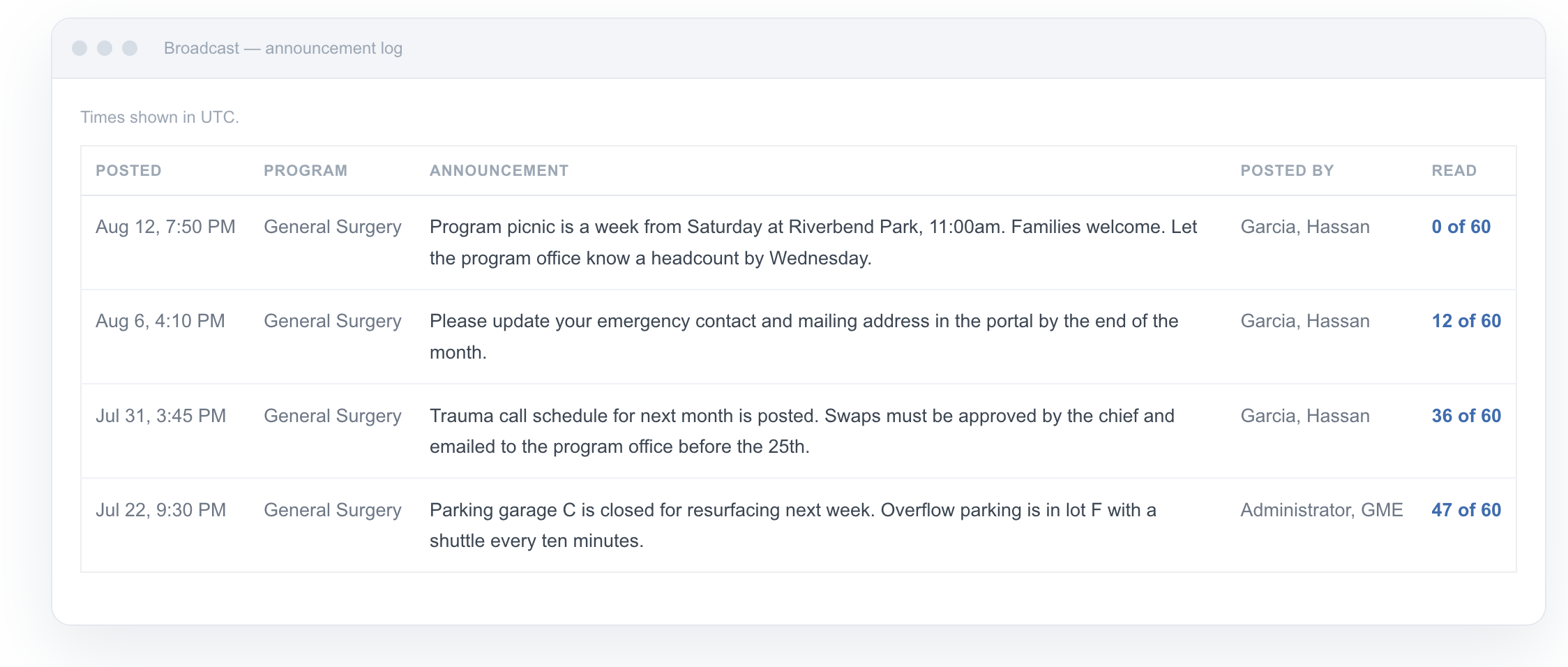
Every program coordinator knows the drill. A room changes, a deadline moves, the call schedule posts — and now you have to make sure sixty residents actually find out. So you send the email that half of them will skim, update the group text that’s missing three interns and two people who rotated off, and still spend the next morning answering “wait, where’s conference?”
We built ResQ Broadcast to end that scramble. There’s nothing new for residents to install — Broadcast lives inside the ResQ app they already use to record their hours, so on day one it reaches everyone.
Three steps, and it’s on every resident’s phone
Broadcast was designed to be faster than the email you’re replacing.
Select your program. Program administrators post from the Program Admin portal to the program they manage. The GME office can reach any program it oversees, from the same portal it already uses.
Write it, or start from a template. Type your own message — up to 500 characters — or start from a ready-made template for the things you send every week: conference reminders, room changes, deadline reminders, policy updates, schedule-posted notices.
Post — it pushes instantly. Every announcement fires a push notification and lands in the resident’s in-app Dashboard Announcements feed, labeled with your program, the date, and who posted it. The same message for everyone, no version drift. Residents on ResQ app 2.8 or newer open announcements in the app; on older versions they still receive the push and can read it on the lock screen.
Know it landed — resident by resident
The email blast never told you who actually read it. Broadcast does. Every announcement keeps its own record — click the read count in your log and you’ll see each resident with a clear status and a timestamp:
- Read — they opened the announcement in the app.
- Push sent — the notification was delivered to their device.
- Not sent — there’s no registered device, or notifications are off, so you know exactly who to nudge in person.
Following up becomes targeted instead of a mass re-send to everyone, including the people who read it the first time.
The messages you send every week, pre-written
The announcements coordinators send over and over don’t need to be retyped. Pick a template, tweak the details, and post — or start from a blank message whenever you want. Room changes, deadlines, conference reminders, and schedule-posted notices are one click away.
Announcements, not patient data
Broadcast is deliberately narrow, and that’s a feature. Because announcements only go out to the program, there are no resident replies that could carry patient details back in. The composer states the rule plainly on screen, and with no attachments and a 500-character limit, a Broadcast is announcement length — not case discussion.
A note on framing: Broadcast is one-way and text-only, built for program and logistics communication — never patient names, identifiers, or care details. It’s designed so protected health information has no place to go.
Built for the people residents already hear from
Program Coordinators get one channel that reaches 100% of residents — and tells you who has read it — in place of the email blast and the group text you keep patching. Program Directors get program-wide messages out with your name on them, and know they landed before the next conference or deadline. GME administrators and DIOs can reach any program they oversee, from the same office they already use.
Where Broadcast sits
Broadcast joins the ResQ family alongside WorkTime™ Automation (the app that records the hours automatically), WorkTime™ Awareness (the live dashboard and real-time alerts), and WorkTime™ Analytics (the reports built on recorded hours). The app residents already carry to record their work hours now carries your announcements too.
See it on your own program.
The fastest way to understand Broadcast is to watch one go out. In a short walkthrough with the ResQ team, we’ll post an announcement, watch it hit the app, and see the read receipts come back.