
ResQ Work From Home
Record & Document hours from remote locations using the Work From Home feature
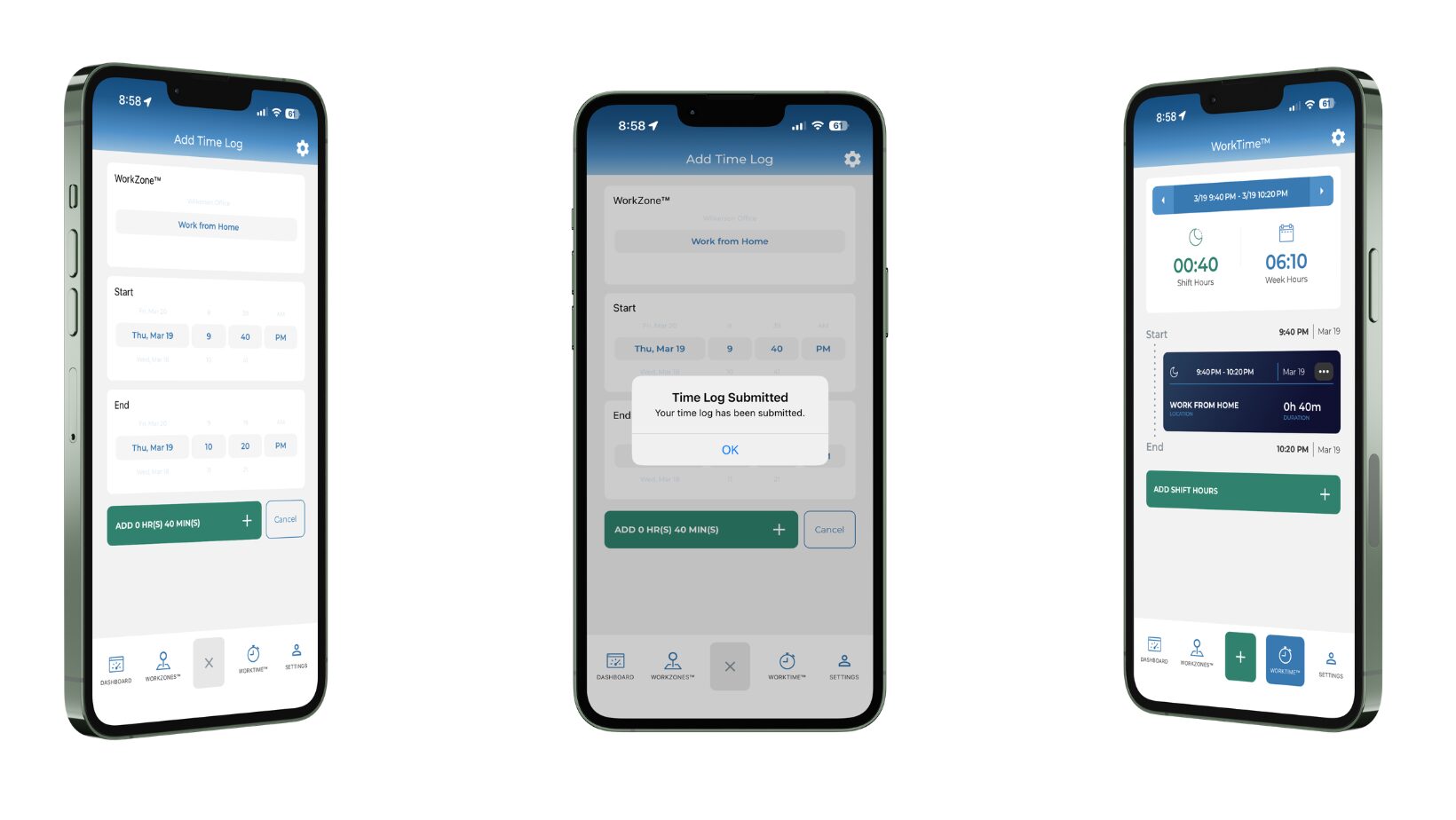
We know residents’ work doesn’t stop when they leave the hospital. Whether you’re reviewing charts at your kitchen table, preparing for rounds from the couch, or handling telehealth follow-ups late in the evening, clinical and educational work performed from home counts toward your ACGME duty hours.
Until now, logging those remote hours has often meant extra steps, forgotten entries, or trying to reconstruct your day from memory at the end of a long week.
That changes now.
We’re excited to announce the upcoming Work From Home function in the ResQ App — a simple, built-in tool that lets you manually document your remote work hours directly in the app with just a few taps.
If you are interested in learning more or adding this feature, please email us at support@resqmedical.com
How Work From Home Works in ResQ
1. Tap the green + icon from the menu option in the app’s main WorkTime™ screen.
2. From the WorkZone section, scroll to “Work From Home”
3. Enter your start time & end time and add the shift.
4. The app instantly calculates the duration and adds it to your weekly total in the WorkTime screen.