
Dashboard
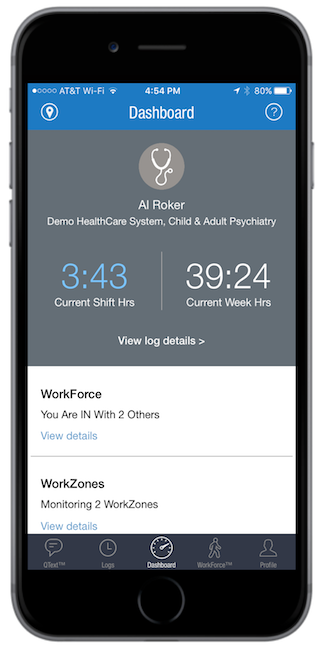
Learn MoreThe Dashboard provides an overview of the ResQ app – in a single screen. Residents can easily view their daily and weekly hours. The WorkForce section indicates their current status, and the number of other users who are also “IN”. Users can also quickly view the number of WorkZones ResQ is actively monitoring and quickly link to view the boundaries on a map.
In the news
ResQ Medical Partners With Arnett Family Medicine
ResQ Medical is proud to partner with Arnett Family Medicine to deploy its location automation platform which automatically records work hours for residents and students. Arnett Family Medicine joins a growing list of institutions who have selected ResQ Medical to…
Feature Update: WorkZone Live™
ResQ Releases WorkZone Live™ ResQ Medical’s new WorkZone Live™ view now allows GME and Program administrators to quickly view the number of trainees actively working in each WorkZone, in real time. This functionality provides a dynamic, up-to-date display of…
Important Update: “Login with MedHub” Functionality Disabled
The Login With MedHub Function Has Been Disabled As part of our ongoing efforts to streamline and improve the ResQ onboarding experience, we want to inform all administrators and resident users that the “Login with MedHub” function has been disabled. This change is a…