
WorkTime™ Awareness
See the violation coming, not the report afterwards.
Automation records every hour as residents move through each clinical site. Awareness turns those hours into something you can act on now — a live dashboard and real-time alerts that show where ACGME risk is building across every program, while there is still time to change a schedule. Request a demoSee what you get
Built for Program Directors, Coordinators, GME administrators and DIOs — with visibility across every program in real time.
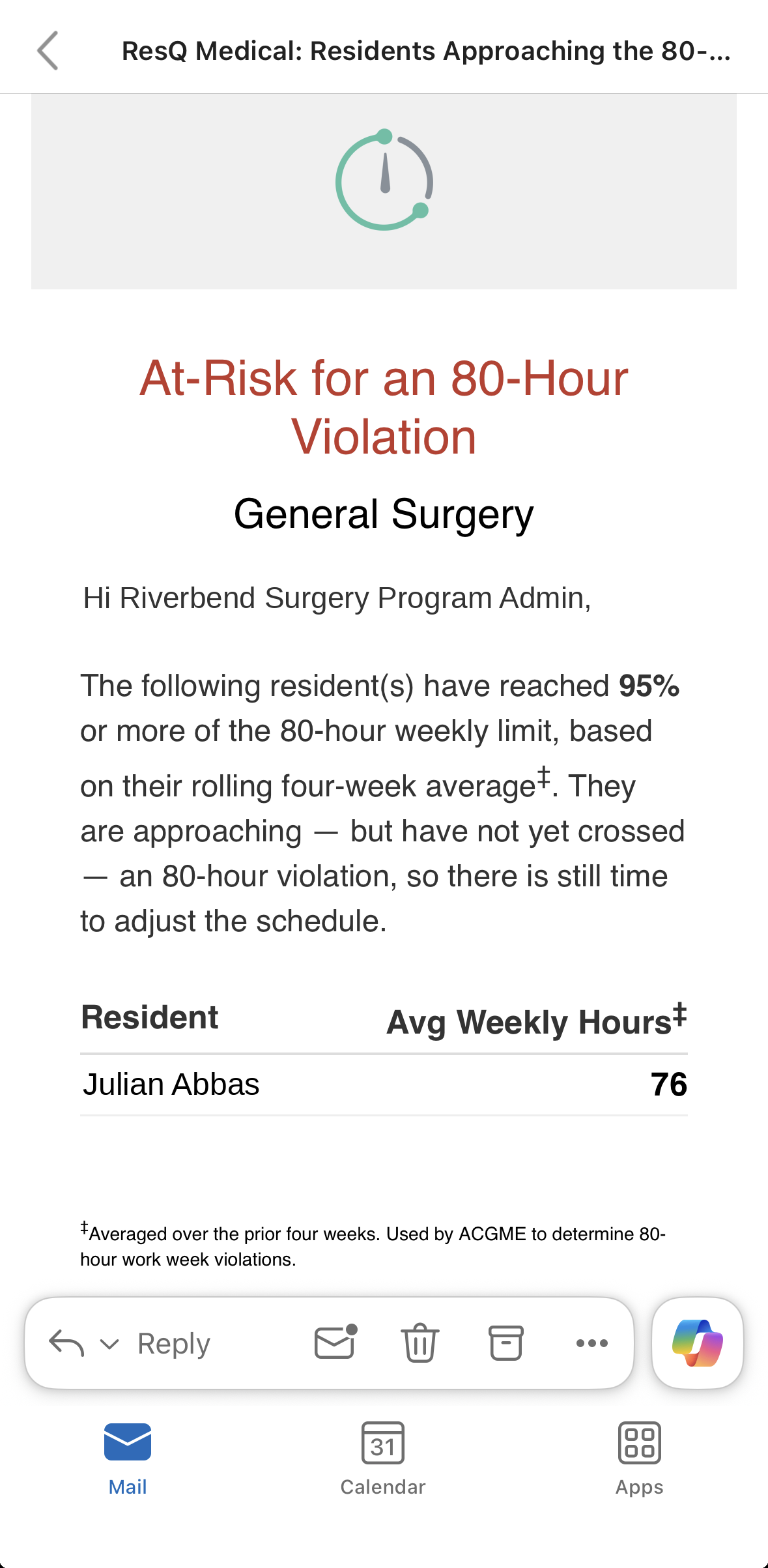
Real-time alert
The 80-hour alert, before it becomes a violation.
WorkTime™ notifies administrators the moment a resident reaches 95% of the 80-hour weekly limit on their rolling four-week average. They are approaching a violation — not past one — so there is still time to adjust the schedule.
- Triggers at 95% of the 80-hour limit — an early warning, not an after-the-fact flag.
- Uses the rolling four-week average ACGME averages over, so building risk is caught early.
- Names the resident and program, and goes straight to the administrator.
Based on the resident’s rolling four-week average, per ACGME.
The problem
Most work-hour problems are discovered after they happened.
By the time an 80-hour breach appears in a monthly review, the month is over. The schedule that caused it has already run, the resident has already worked it, and the only thing left to do is document it.
What you get
Four things, all from hours already being recorded.
No submissions to collect, no data entry to police. The signals run on what WorkTime™ Automation already records.
Early warning
Alerts on residents approaching 80-hour, 24+4 and day-off thresholds, while the schedule can still change.Live dashboards
Current status across your program, or across every program in the institution, without running a report.Active-shift signals
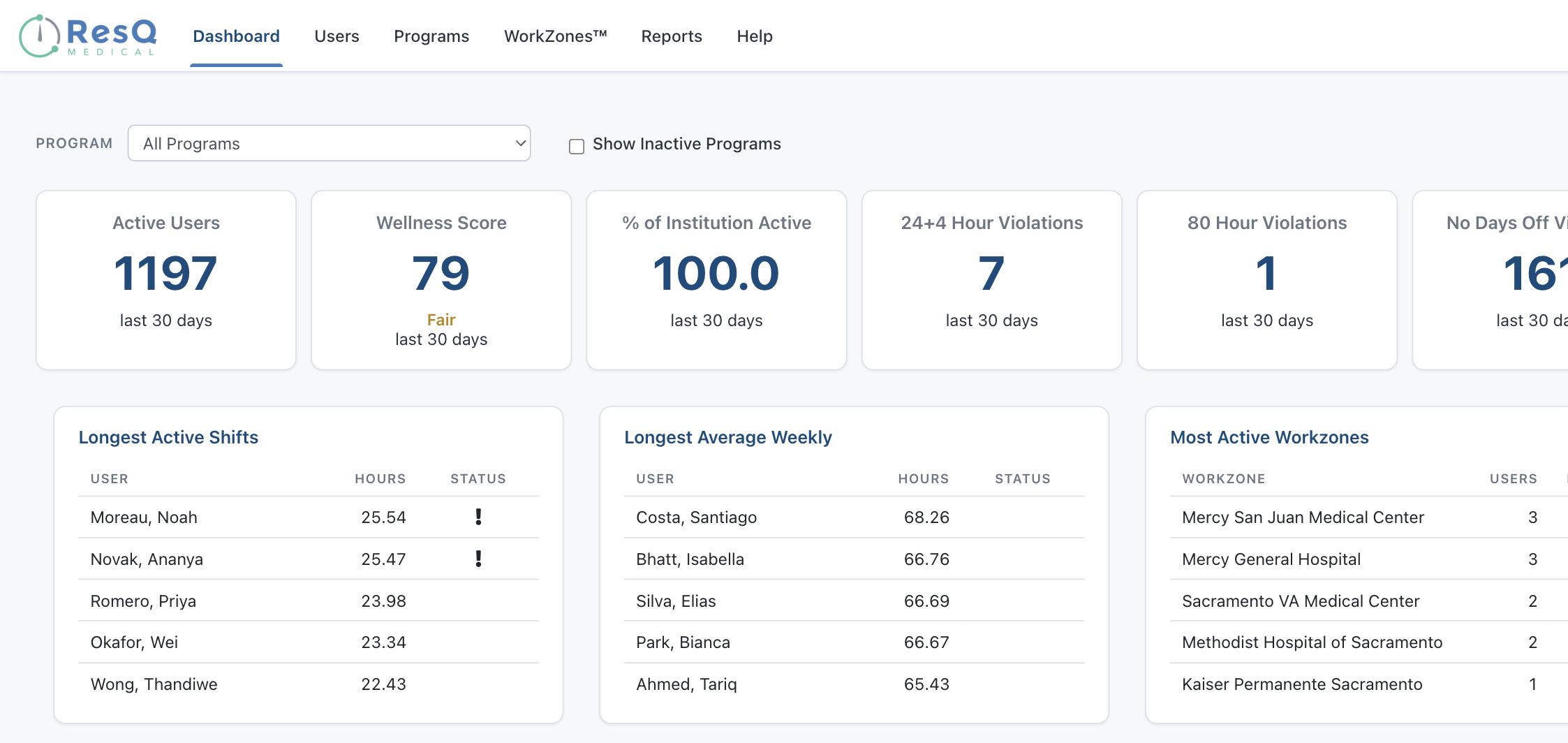
Longest Active Shifts, Longest Average Weekly Hours and Most Active WorkZones™ — surfaced on the landing view.Institution and program views
Drill from an institution-wide picture down to a single program, without switching tools or exporting anything.Early warning
Act on the week that is still ahead.
The ACGME 80-hour limit is averaged over four weeks, which means risk accumulates quietly. Early warning surfaces it while a schedule change still fixes it.- Residents trending toward an 80-hour average breach
- 24+4 continuous duty and day-off thresholds
- Visible per program, or across the whole institution
- Real time — not a monthly report of what already happened
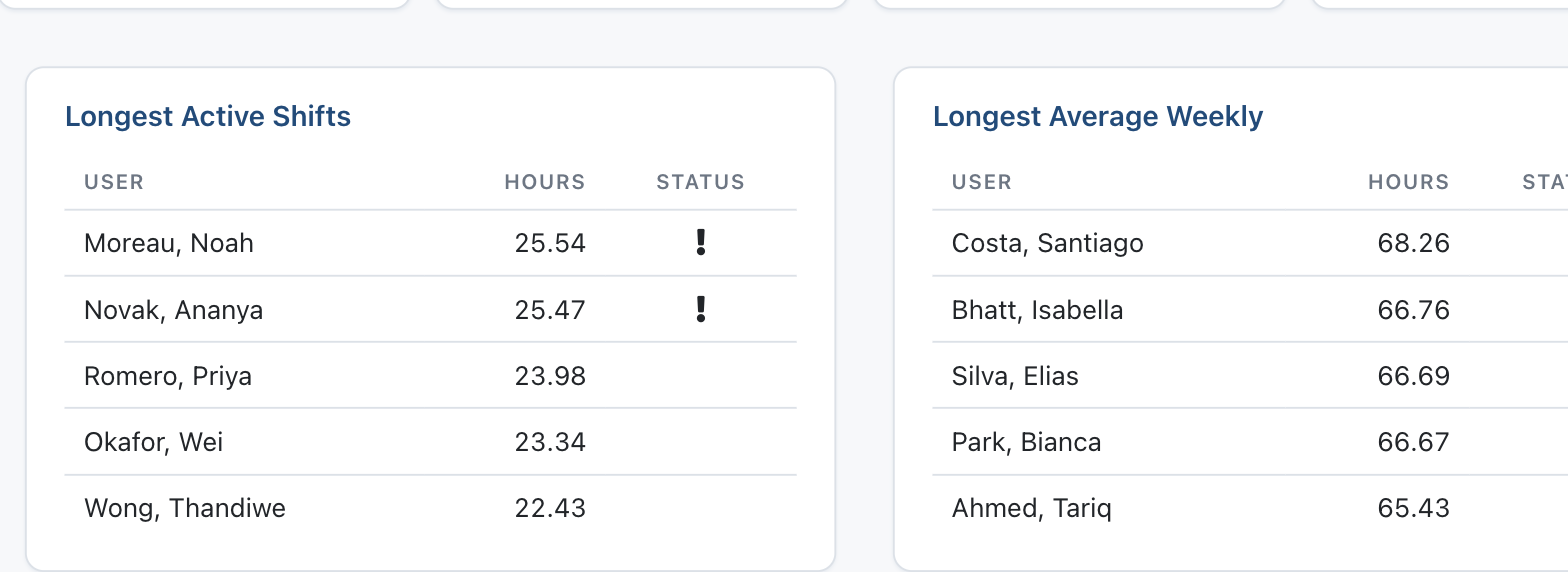
Dashboards
Your whole institution on one screen.
GME administrators see every program. Program Directors and Coordinators see their own. Same data, scoped to the role.- Active users, hours and violations at a glance
- Filter by program to move from institution-wide to specific
- Longest shifts and highest weekly averages surfaced automatically
- No report to run before you can see where you stand
Who it is for
Scoped to the role, from one set of recorded hours.
Program-level users see their own programs. The GME office sees everything.
Program Directors
See risk building in your own residents in time to change a schedule — while the week is still ahead of them.Program Coordinators
Stop chasing submissions. The signals are already on the dashboard, filtered to the programs you run.GME administrators and DIOs
Institution-wide visibility across every program, with the ability to drop into any single one without changing tools.Common questions
Before you ask
Does this require residents to submit anything?
No. Every figure comes from hours WorkTime™ Automation already recorded. There is nothing to collect and nothing to chase.Can Program Directors see other programs?
No. Program-level access is limited to the programs a user manages. GME administrators and DIOs see across every program at the institution.How does the 80-hour alert reach us?
It goes by email to the program administrator the moment a resident reaches 95% of the 80-hour limit on their rolling four-week average — no need to be logged in to catch it.Does it replace our residency management system?
No. Recorded hours sync to MedHub, Medtrics and New Innovations, so this sits alongside the system you already use.Is the dashboard real-time?
Yes. The dashboard and its signals — active shifts, weekly averages, active WorkZones™ and early-warning flags — reflect hours as they are recorded, not a monthly snapshot.The rest of the ResQ family
Where this sits.
See where your programs stand right now.
A 30-minute walkthrough with the ResQ team, using your own programs as the example.