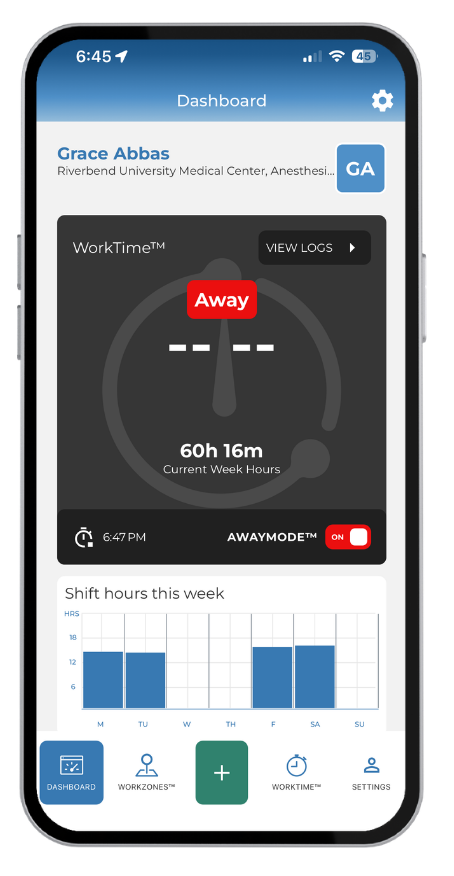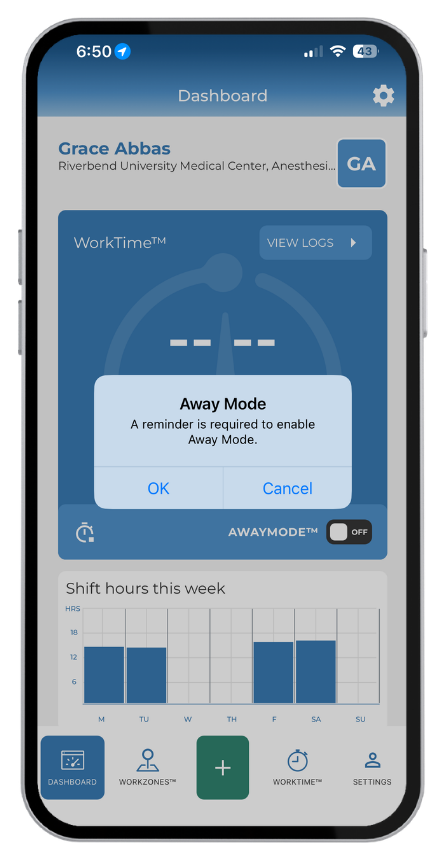
AwayMode™
Learn MoreUse AwayMode™ To Turn Off Automatic Logs
Entering a WorkZone™ on personal time and you’d like to disable the automatic recording of work hours? We’ve got that covered. When AwayMode™ is enabled, the app stops recording hours on the device.
ResQ will automatically notify you when it’s time to resume recording your hours.
The device prompts the resident to set a notification reminder when they are ready to resume recording work hours again. Once the reminder occurs, simply click “Resume Work” and work hours begin recording. AwayMode™ allows users to have complete control of their automated logs.


Use AwayMode™ To Turn Off Automatic Logs
Entering a WorkZone™ on personal time and you’d like to disable the automatic recording of work hours? We’ve got that covered. When AwayMode™ is enabled, the app stops recording hours on the device.

ResQ will automatically notify you when it’s time to resume recording your hours.
The device prompts the resident to set a notification reminder when they are ready to resume recording work hours again. Once the reminder occurs, simply click “Resume Work” and work hours begin recording. AwayMode™ allows users to have complete control of their automated logs.

Use AwayMode™ to temporarily disable automatic recording of hours.
AwayMode™ allows residents to temporarily disable the functionality that automatically records their work hours. Entering a WorkZone™ on personal time and you would like to disable the automatic recording of work hours? We’ve got that covered. When AwayMode™ is enabled, location is disabled and hours will not record on the device.
ResQ will automatically notify you when it’s time to resume recording work hours.
The device prompts the resident to set a notification reminder when they are ready to resume recording work hours again. Once the reminder occurs, simply click “Resume Work” and work hours begin recording. AwayMode™ allows users to have complete control of their automated logs.
Satisfied Residents
Satisfied Residents
“It takes 95% of the work of logging duty hours off of me. It makes it incredibly easy to log in at the end of the week, make a few adjustments or corrections, and then submit!”
“I have been using the ResQ app since the beginning and I think it’s an extremely useful app…It makes my life a little easier especially because it tracks your time at ALL of the main sites we work at as residents.”
“ResQ is revolutionizing the way that resident work hours are tracked and understood.”
Using ResQ “is like putting the ADT sign out on the front lawn” when it comes to addressing questions or concerns about work hours during ACGME site visits.
“I personally am a huge fan of the app. It makes logging hours a one-click task, and I like not having to think about it.”
“All of the trainees who are using the product have reported ease in use and decrease in stress since duty hours logging is “one more thing”
“Without question, ResQ simplified as both a resident and fellow by alleviating my inbox of numerous email “reminders” to log my duty hours from program directors.”
In the news
No More Passwords: ResQ Login Link is Now Live
ResQ Login Link No more usernames. No more passwords. Just fast, secure access. We know how busy your day is as a resident. Most of the time the ResQ app keeps you logged in so you can quickly log hours, review your schedule, or document a shift. But when you do get…
Now Available: ResQ Work From Home Feature
ResQ Work From Home Record & Document hours from remote locations using the Work From Home feature We know residents’ work doesn’t stop when they leave the hospital. Whether you’re reviewing charts at your kitchen table, preparing for rounds from the couch, or…
ResQ Medical Partners With Arnett Family Medicine
ResQ Medical is proud to partner with Arnett Family Medicine to deploy its location automation platform which automatically records work hours for residents and students. Arnett Family Medicine joins a growing list of institutions who have selected ResQ Medical to…